How to Apply for a Bybit Taiwan Card? The Latest 2026 Guide to Opening a Card with No Entry Requirements
The Bybit Taiwan card can currently be applied for with a Chinese ID card, with no entry requirements and no passport needed. After opening the card, you can link it to WeChat, Alipay, and Apple Pay. This article documents the entire application process based on personal experience, including choosing a registration node, KYC verification, entering a Taiwan address, depositing funds, claiming the 120 USDT new-user reward, and calculating the actual cost of card transactions, helping you avoid unnecessary detours and quickly obtain this hard-to-get Taiwan-region USDT card.
Expand table of contents ▾
-
What is the Bybit Taiwan card used for? Why is it worth opening?
-
- Step 1: Choose the right network node before registering with Bybit
- Step 2: How do I enter an invitation code when registering?
- Step 3: How do I complete identity verification (KYC)?
- Step 4: Link your phone number before opening the card
- Step 5: Where do I apply for the Bybit Taiwan card?
- Step 6: How do I enter a Taiwan address? Use an address generator
- Step 7: Where do I enter the referral code when submitting the application?
- Step 8: Answer due-diligence questions after submission
-
How do I top up after opening the card? Transfer USDT from Binance
A no-entry-requirements application window has recently appeared for the Bybit Taiwan card. You can open the card directly with a Chinese ID card, without a passport, and then link it to WeChat, Alipay, and Apple Pay. I tested it myself and had no problems opening the card successfully. There is currently little related information online. This is clearly a bug in Bybit, and it is uncertain how long it will last, so I recommend acting as soon as possible after reading this.
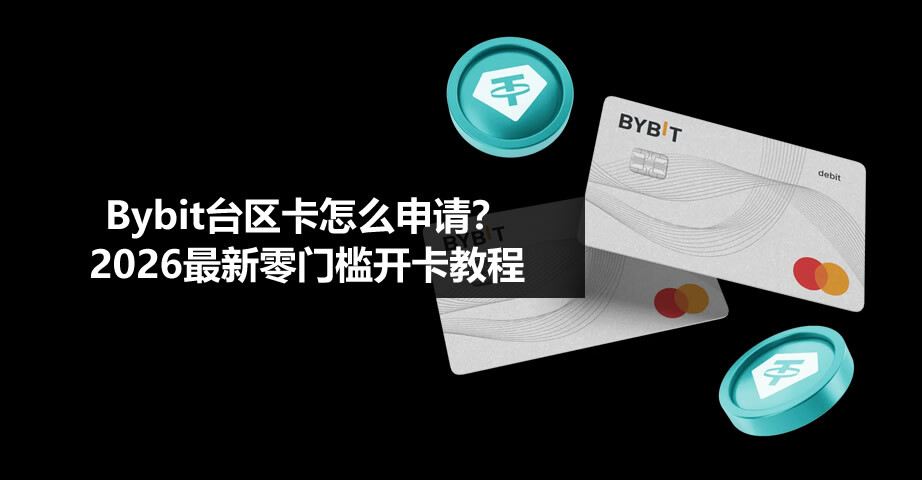
What is the Bybit Taiwan card used for? Why is it worth opening?
Let’s first discuss the card’s practical value; otherwise, you may wonder, “What’s the point of having one more card?”
First advantage: It can be linked to WeChat.
Fewer and fewer USDT cards can now be linked to WeChat. The Bitget Wallet card cannot be linked, and neither can the Gate card. Among major exchanges, the Bybit card may be the only one that can still be linked to WeChat.
Second advantage: No entry requirements—an ID card is enough.
Normally, using a Chinese ID card to open a Bybit card only allows you to open cards from Kazakhstan, Mongolia, Kyrgyzstan, and similar countries. These are relatively obscure “steppe cards.” This Taiwan card can be opened directly with an ID card and does not require a passport, so the entry requirements are genuinely low.
Third advantage: A 120 USDT new-user reward.
It consists of a 10 USDT top-up reward and up to 110 USDT in card cashback. I’ll explain how to claim it below.
It supports linking to WeChat, Alipay, and Apple Pay, covering a wide range of everyday payment scenarios. This card is highly practical.
How do I apply for a Bybit Taiwan card? The latest 2026 guide to opening a card with no entry requirements
Step 1: Choose the right network node before registering with Bybit
You can register through the link below. Registering through my link gives you a 40% fee rebate. Registering through the link or manually entering the invitation code in the app has the same effect, so choose either method.
Bybit is quite selective about the registration environment. Nodes in Japan, the United States, and Hong Kong do not work and may cause registration to fail or create problems when opening the card later.
The most recommended option is to use a Taiwan node directly. If you do not have one, a South Korean node also works; I tested it and had no problems.
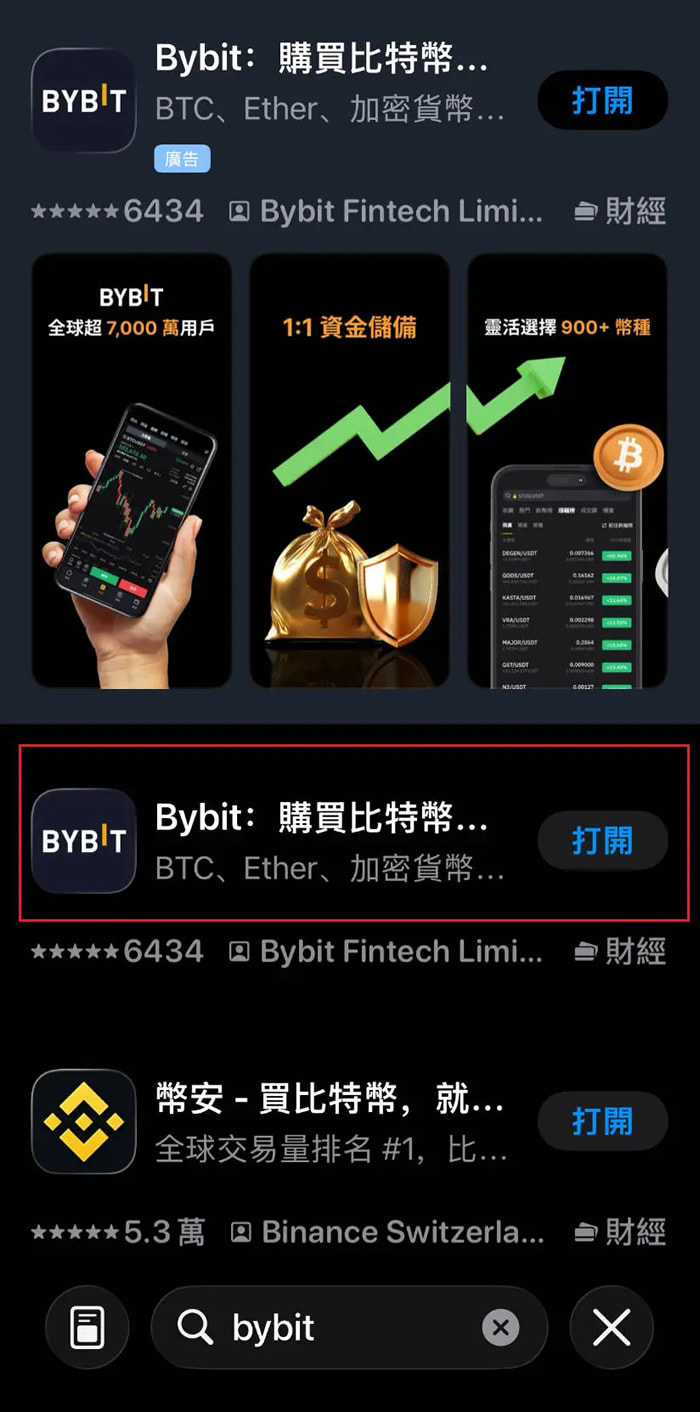
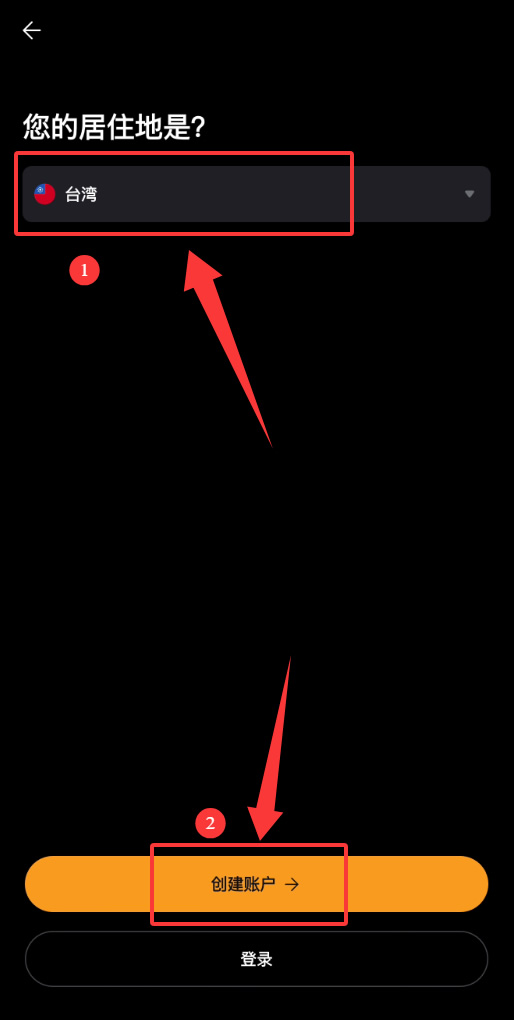
The Bybit app needs to be downloaded from an overseas app store. For example, it can be downloaded normally from the Hong Kong App Store. After downloading and opening it, you must select Taiwan as your country of residence in the first step. This is crucial because opening the Taiwan card later depends on this setting.
Step 2: How do I enter an invitation code when registering?
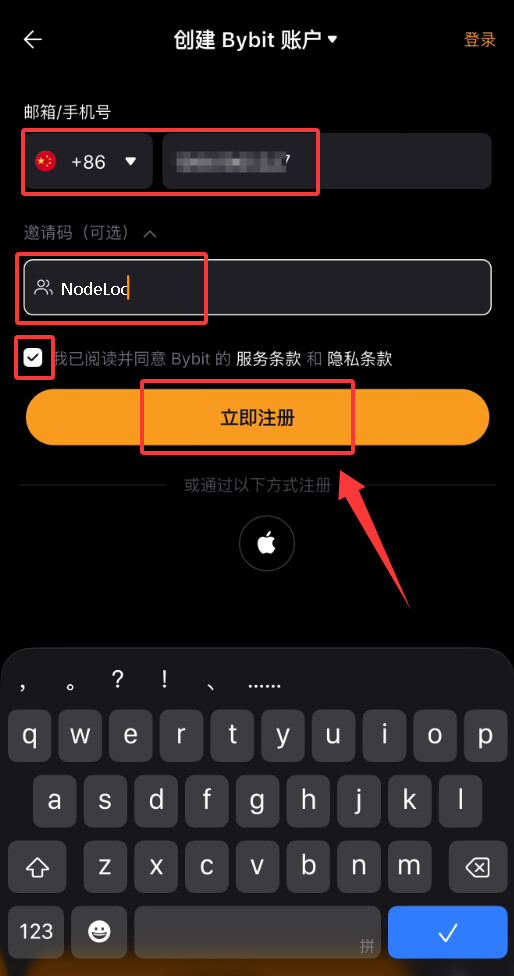
After selecting Taiwan as your country of residence, click 【Create Account】. You can register with a phone number or email address.
Enter your phone number or email address.
Be sure to enter an invitation code. After entering one, you can receive a permanent 20% automatic fee rebate and an exclusive new-user reward. You can enter NodeLoc as the referral code.
Click 【Register Now】.
Verify your phone number, enter the 【verification code】, and set a password. The password must contain at least eight characters, including uppercase and lowercase letters and numbers.
Click 【Register Now】 again to complete account creation.
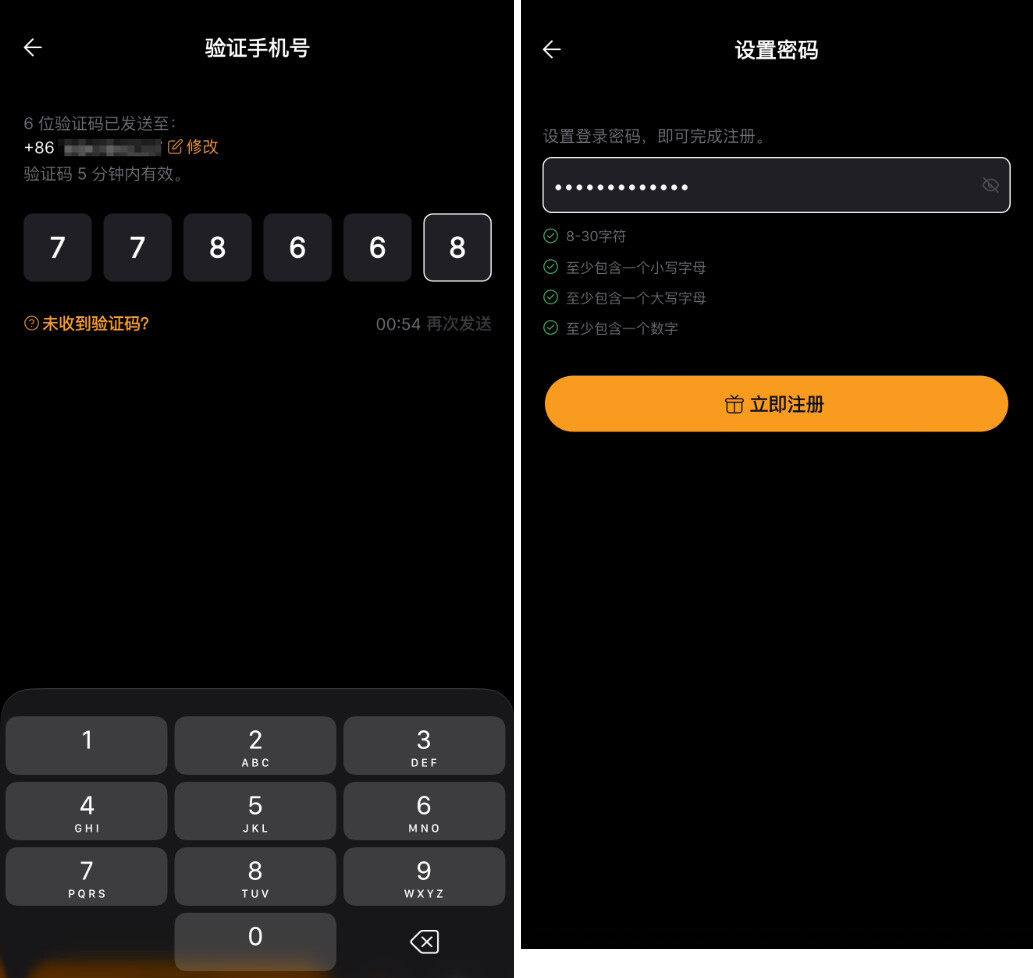
After registration, you must complete KYC (identity verification) to unlock trading and withdrawal functions. Verification usually passes within a few minutes after submission.
Step 3: How do I complete identity verification (KYC)?
Steps:
After registration, you must complete identity verification. This is required; you cannot open the card without it.
-
Enter the verification page and select documents issued in China.
-
Select ID card (no passport required).
-
Upload a front photo of your ID card.
-
Upload a back photo of your ID card.
-
Complete facial recognition verification.
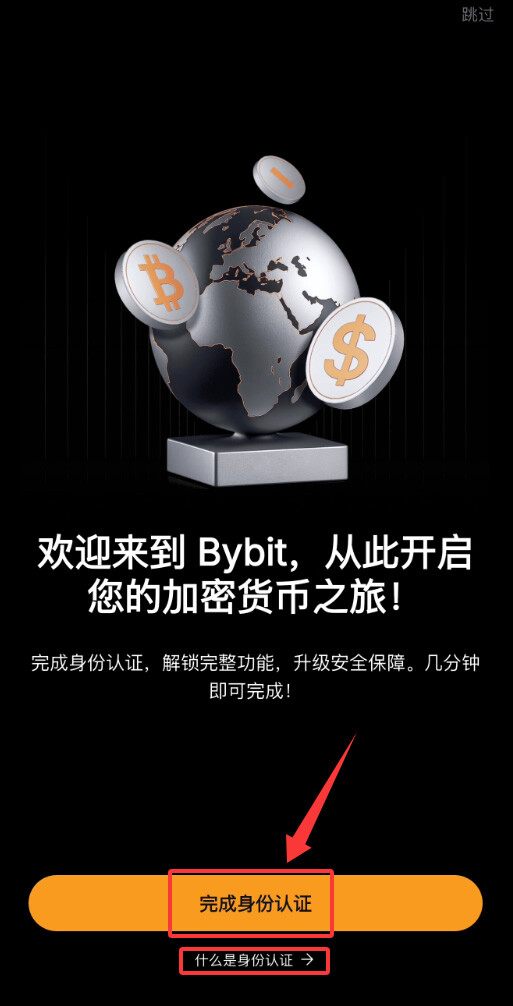
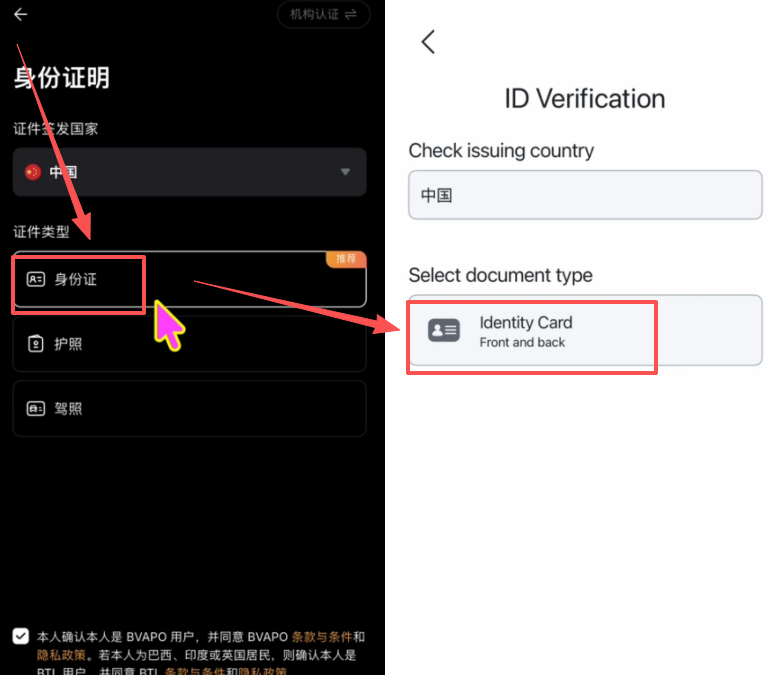
The entire process is simple and can be completed in a few minutes. After verification, Bybit can be used normally.
Note: Do not deposit funds immediately after verification. There is one more step to complete first.
Step 4: Link your phone number before opening the card
Many people skip this step, but I recommend linking your phone number first. Otherwise, you may get stuck due to a bug when applying for the card later.
-
Click the profile icon in the upper-left corner.
-
Click your account.
-
Find 【Security Settings】.
-
Find the 【Phone Number】 option and click to bind it.
-
Enter your phone number and receive the verification code to complete linking.
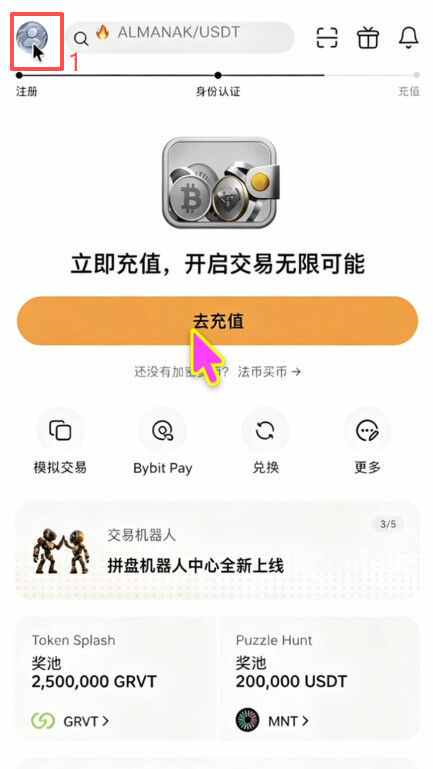
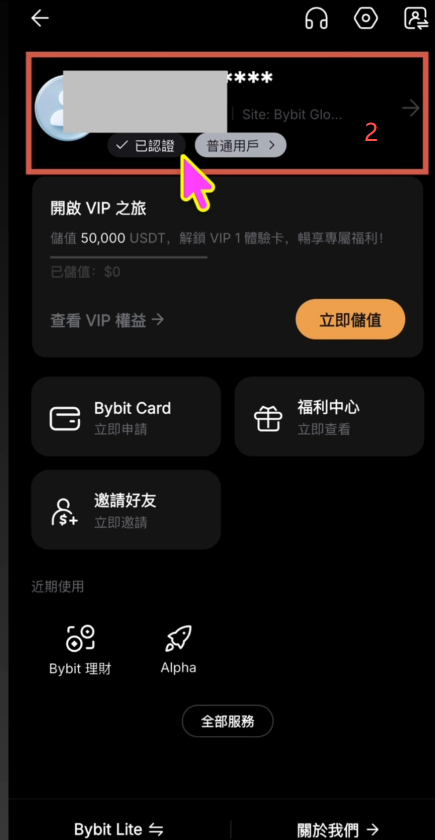
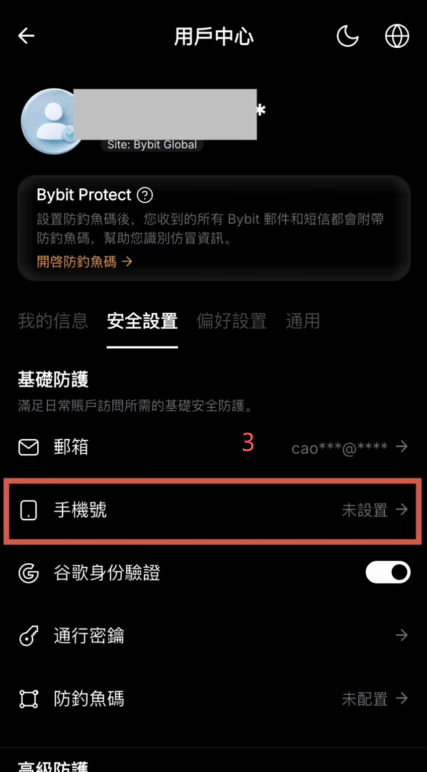
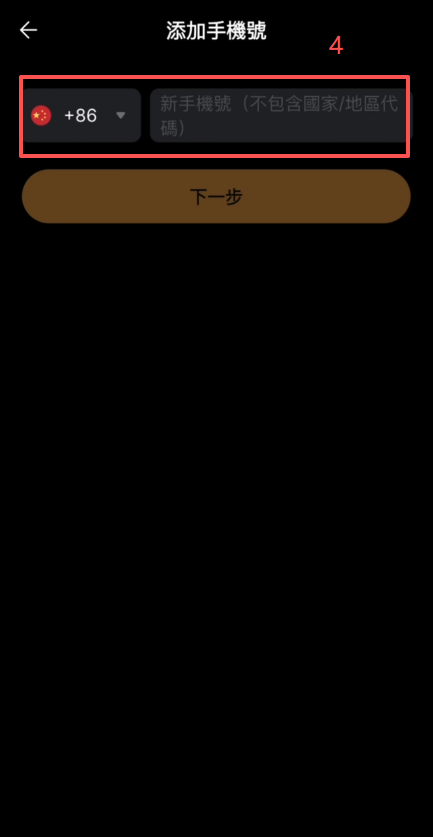
At present, mainland Chinese phone numbers can receive verification codes and be linked normally, but if you have an overseas phone number, using it may be more reliable.
If you skip this step and apply for the card directly, the phone-number form in the application process may encounter a country-code switching bug: you may find that the country code cannot be changed at all. The solution is to exit the application process, return to Security Settings, manually bind your phone number, and then re-enter the application process. I encountered this myself the first time; after going back and linking my number, everything worked smoothly.
Step 5: Where do I apply for the Bybit Taiwan card?
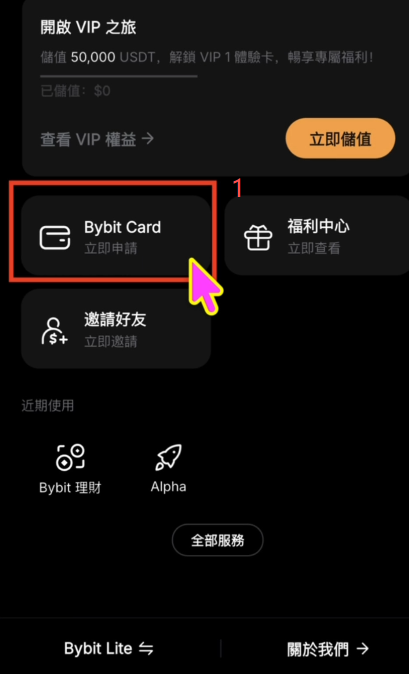
After linking your phone number, return to the Bybit home page, find the application entry for 【Bybit Card】, and click it to begin the card-opening process.
-
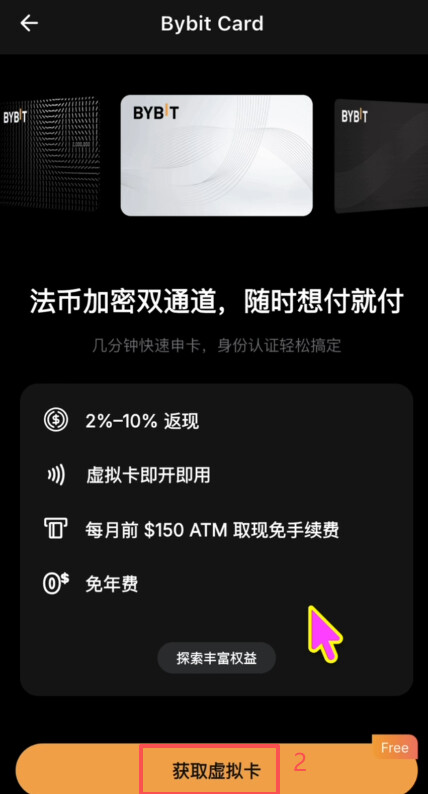
Enter the card introduction page and click 【Get Virtual Card】.
-
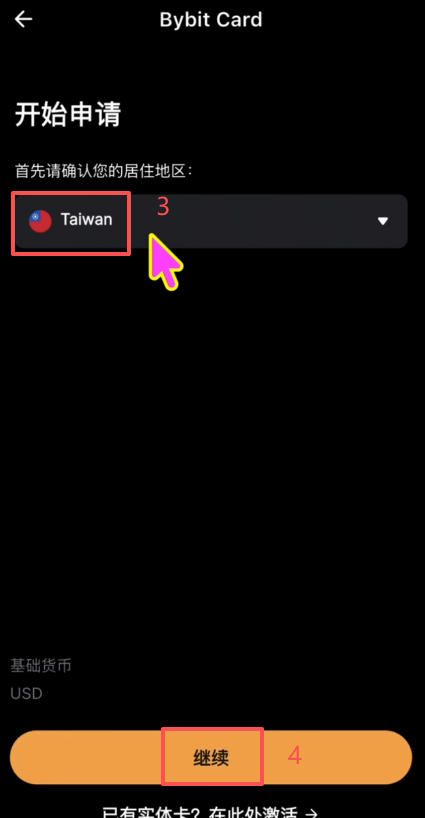
Under Residence, manually select Taiwan (do not use the default option; you must select it manually).
-
Click 【Continue】. The page will display “You are eligible,” with no additional requirements.
-
Enter your employment and income information. Just select the truthful options.
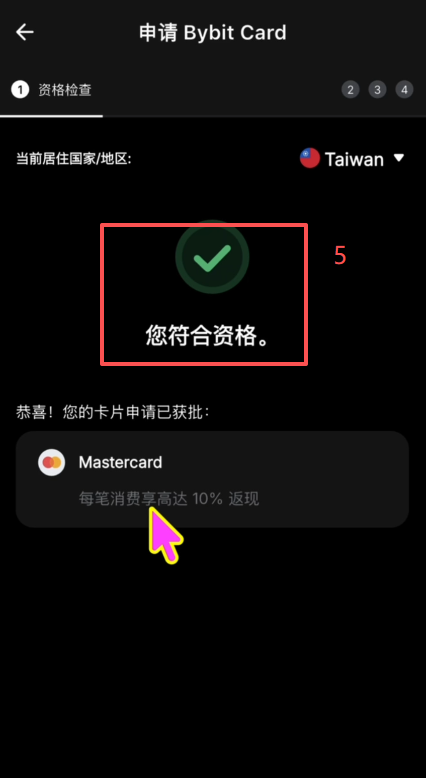
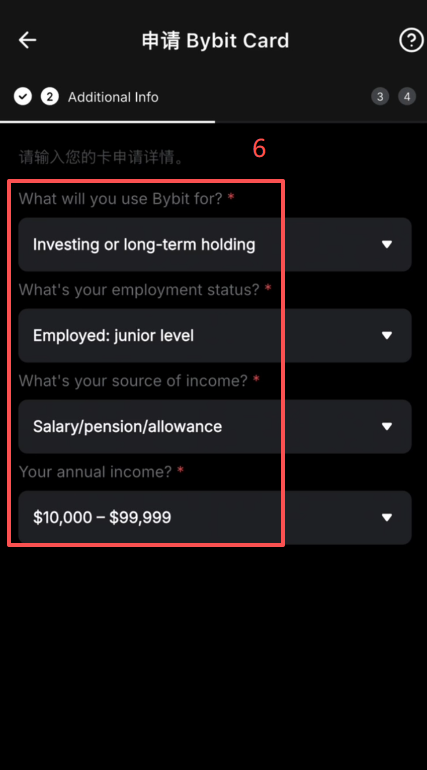
Passing this step means you have passed the eligibility review. You only need to enter the remaining information.
Step 6: How do I enter a Taiwan address? Use an address generator
Applying for the Taiwan card requires a Taiwan address. Many people get stuck here, but the solution is simple.
-
Open Google and search for Taiwan address generator.
-
Find an address in a Taiwanese city and copy it (the generated address is usually in Chinese).
-
Send the Chinese address to an AI, such as ChatGPT, and ask it to translate it into an English-format street address.
-
Enter the translated English address in the corresponding fields.
-
You only need to complete the required fields marked with a red asterisk.
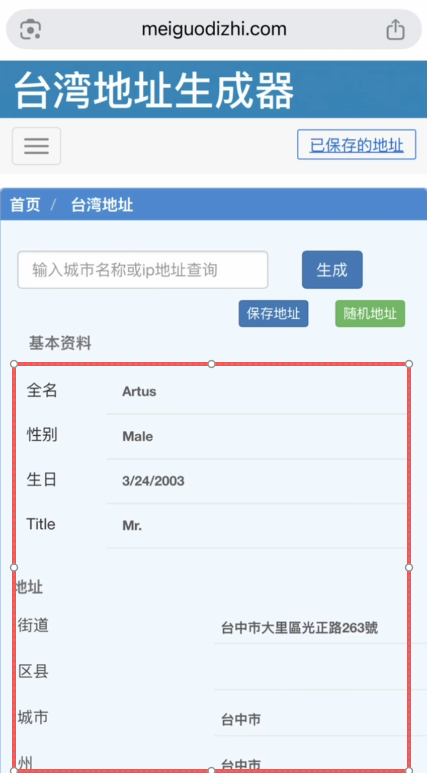
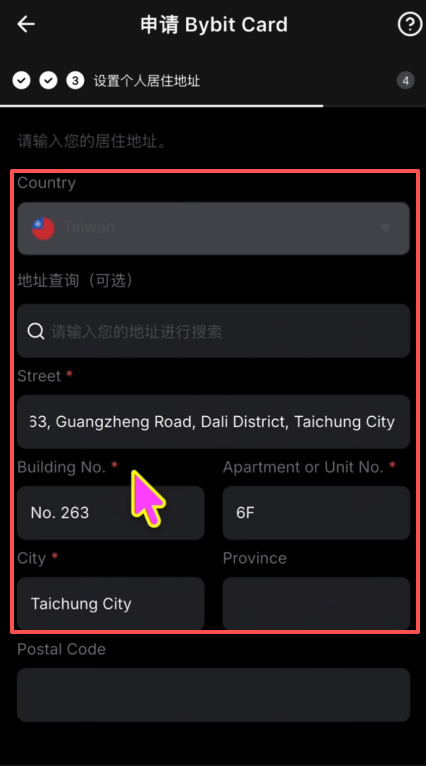
You do not need to submit any proof of address; simply enter the information.
Step 7: Where do I enter the referral code when submitting the application?
After entering the address, the next page is the information confirmation page.
There is a referral-code field here. Remember to manually enter NodeLoc to ensure that you receive the full new-user reward and to give NodeLoc some support—a mutually beneficial arrangement.
After confirming that the information is correct, click 【Submit】 to complete the application.
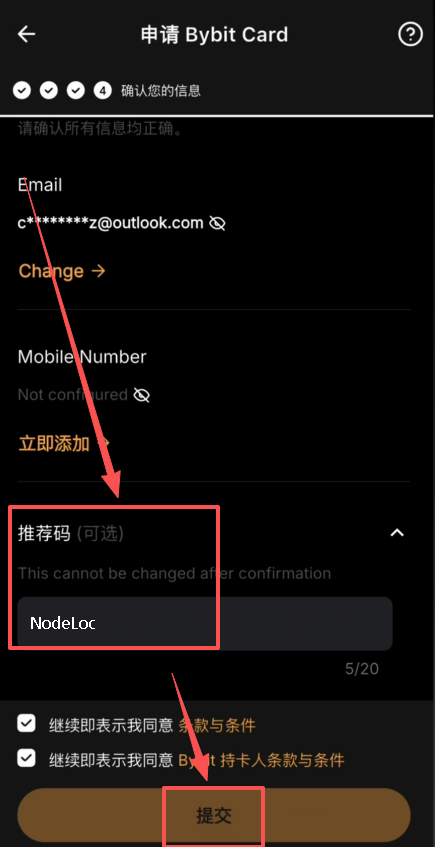
Step 8: Answer due-diligence questions after submission
After submission, you enter the review stage. During this period, check Bybit notifications carefully, as you may be asked to answer additional questions.
Common questions include:
- Are you a politically exposed person? → Select 【No】
- What is the purpose of opening the card? → Answer truthfully
- What is your occupation? → Answer truthfully
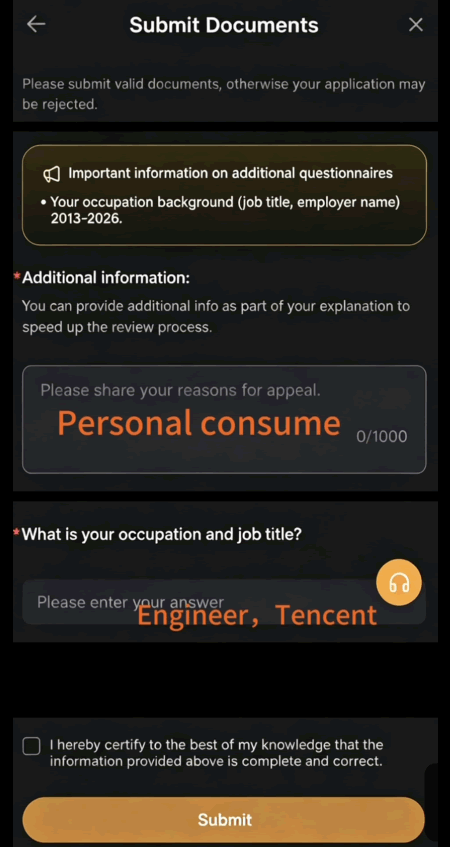
Just answer these truthfully; there are no major pitfalls. Based on my own test, it took four business days from submission to card issuance. It was not particularly fast, so just wait patiently.
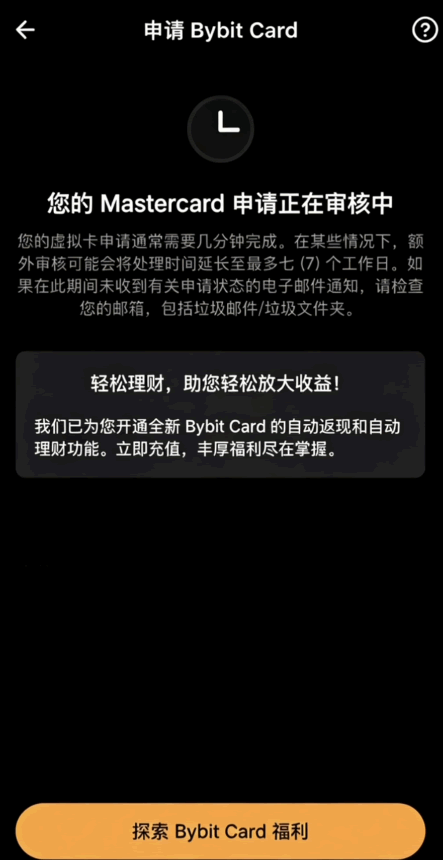
Where is the card issued, and how can I verify it?
After the card was issued, I checked its BIN. Some lookup services showed that it was a card issued in the United States, while others showed the Republic of the Congo or Iraq. The results are inconsistent, so it is impossible to determine exactly where it was issued.
One practical verification method is to try linking it to a US-region Apple ID. If it links successfully, you can basically confirm that it is a US card. Feel free to share your test results in the comments after opening the card.
In my own tests, the card was successfully linked to WeChat, Alipay, and Apple Pay, and there were no problems with everyday use.
How do I top up after opening the card? Transfer USDT from Binance
Once you have confirmed that the card works normally, you can top it up. It is recommended that your first deposit be 100 USDT or more to trigger the new-user reward requirements.
The Bybit exchange itself does not allow users with Chinese identities to buy cryptocurrency directly, so you need to transfer funds from another exchange. Binance works especially well with Bybit. The procedure is as follows:
-
Open the Binance home page and click 【Add Funds】.
-
Select 【P2P Trading】.
-
Enter the Express Zone and choose to buy USDT.
-
Enter the purchase amount.
-
Select a payment method. Alipay is recommended.
-
Review the order and confirm the purchase.
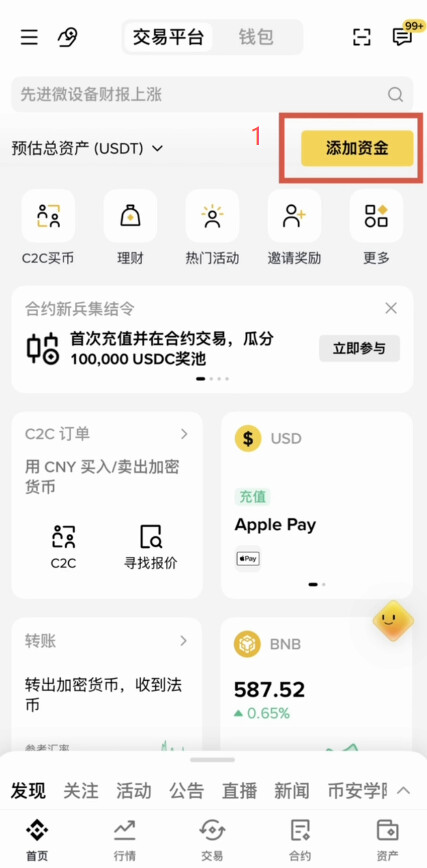
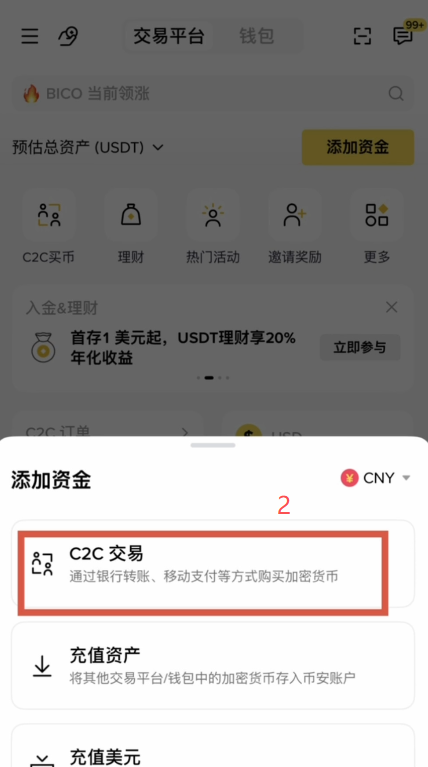
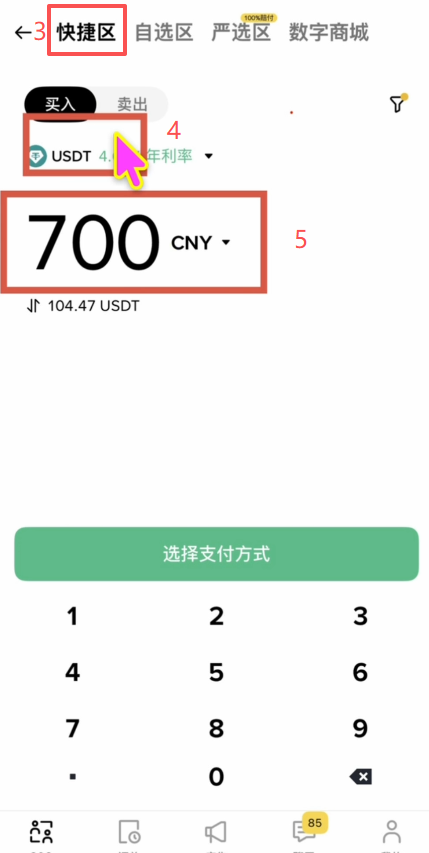
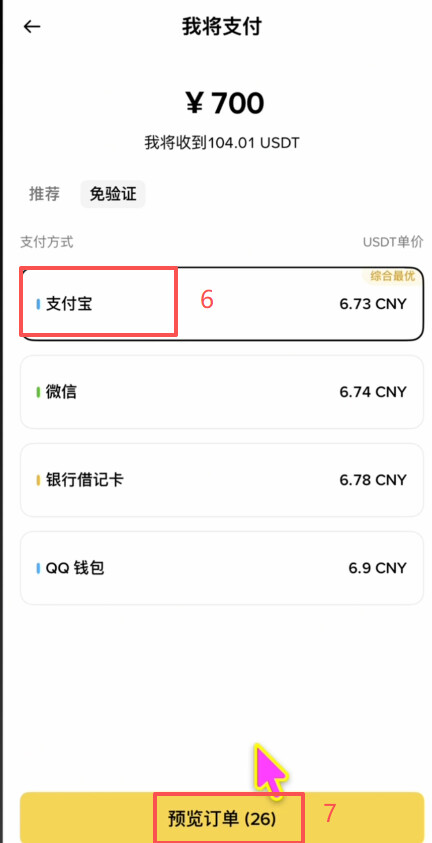
How to transfer funds from Binance to Bybit
After buying USDT, transfer it to Bybit through the BNB Smart Chain (BSC). The loss is almost zero.
-
Open Bybit, click 【Deposit】, and select USDT as the deposit currency.
-
Select the BSC network (BNB Smart Chain).
-
Copy the generated deposit address.
-
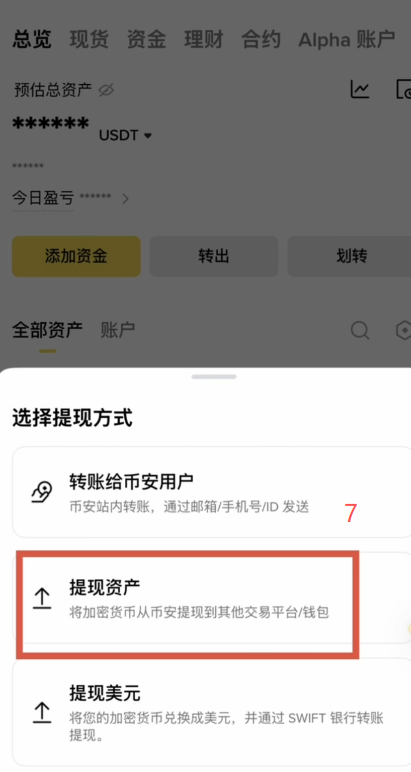
Open Binance, go to the Assets page in the lower-right corner, and find the 【Withdraw】 button.
-
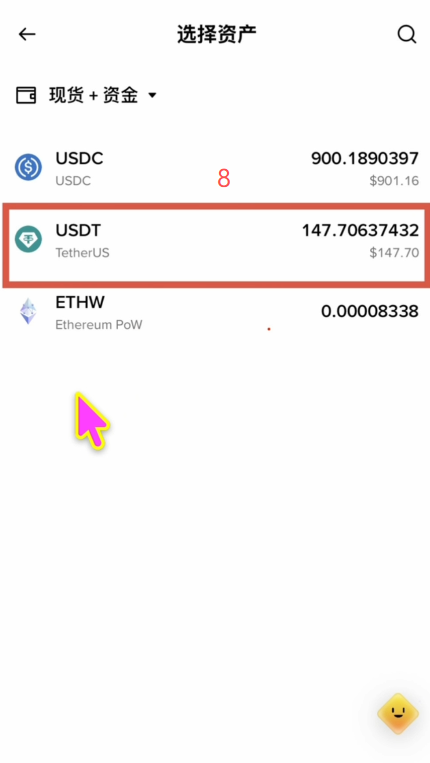
Select 【Withdraw Assets】 → select USDT.
-
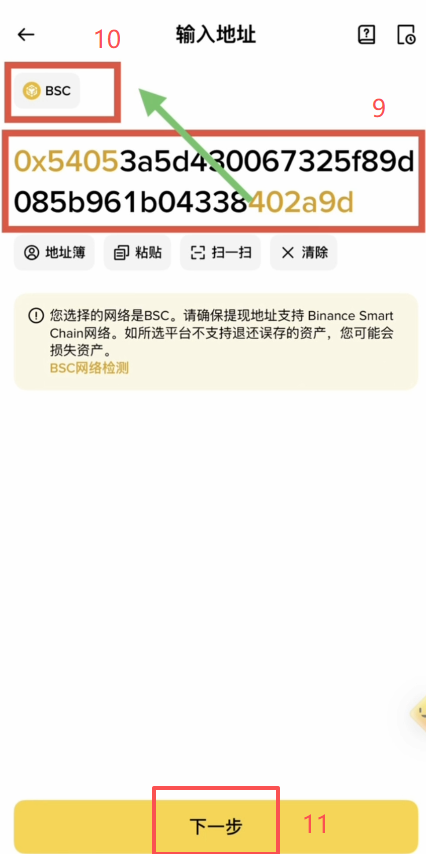
Paste the Bybit deposit address you copied earlier.
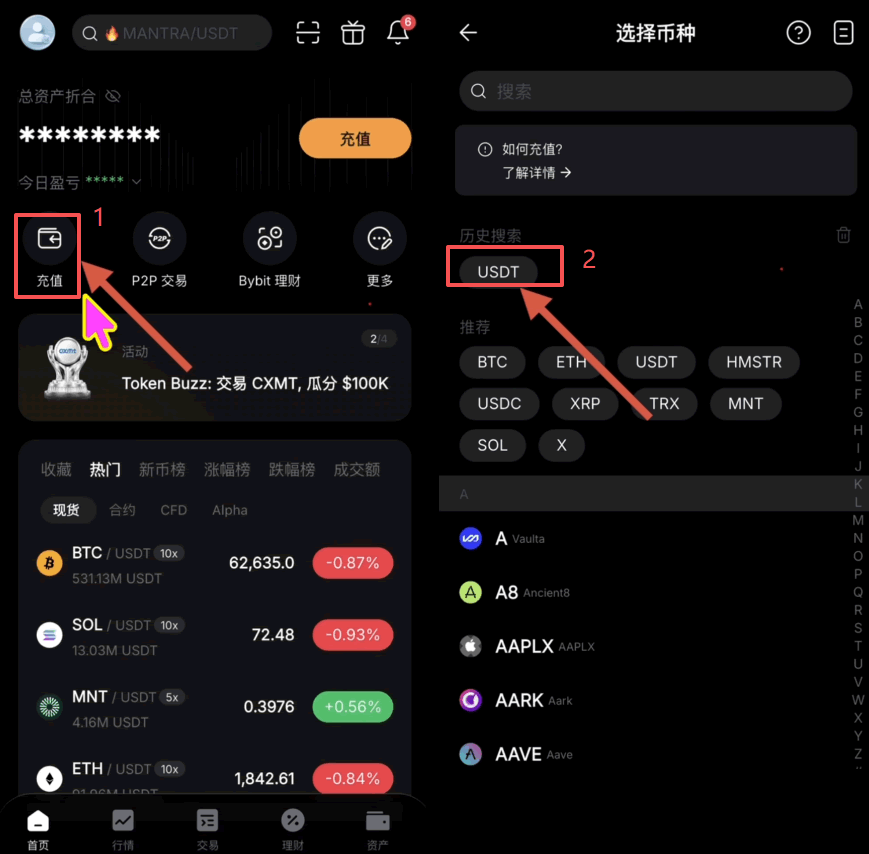
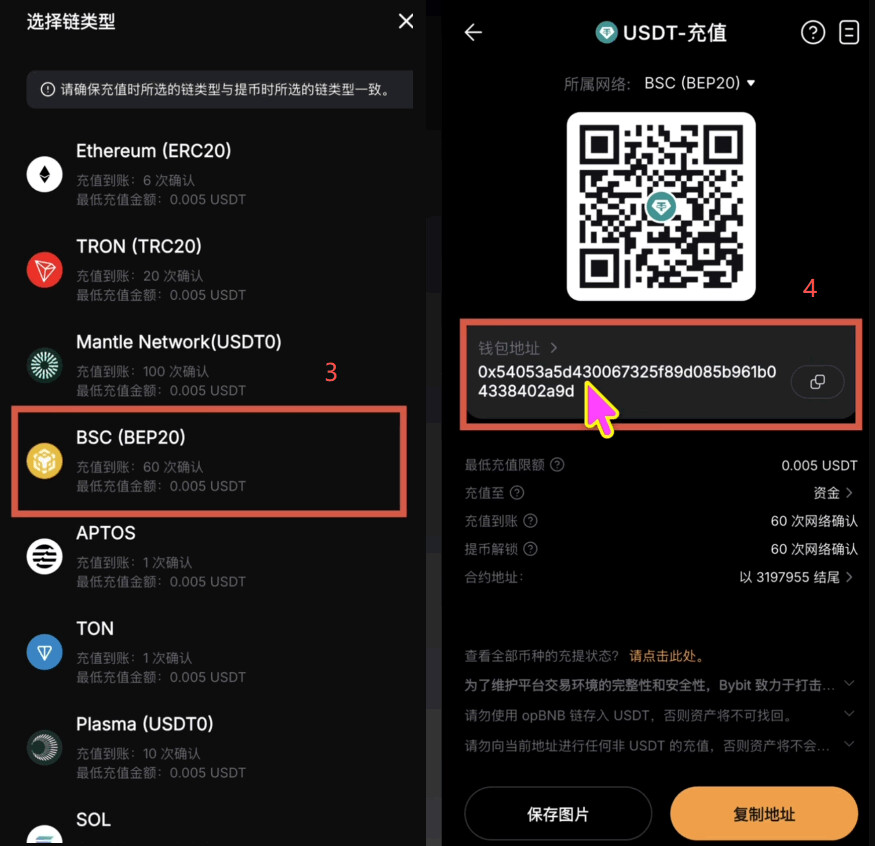

7. Be sure to select the BSC network, matching the network selected on Bybit; otherwise, the funds may be lost.
-
Click 【Next】 and enter the withdrawal amount.
-
Enter the verification code and confirm the withdrawal.
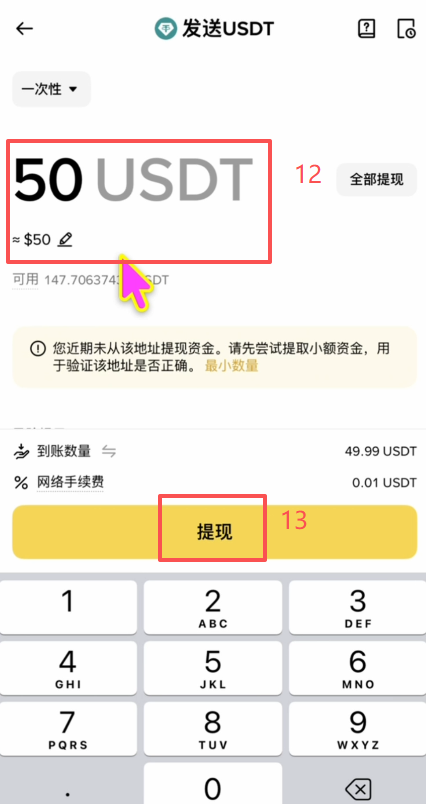
The entire process incurs almost no loss. Once the funds arrive, you can use the card directly.
What is the actual transaction cost of this card?
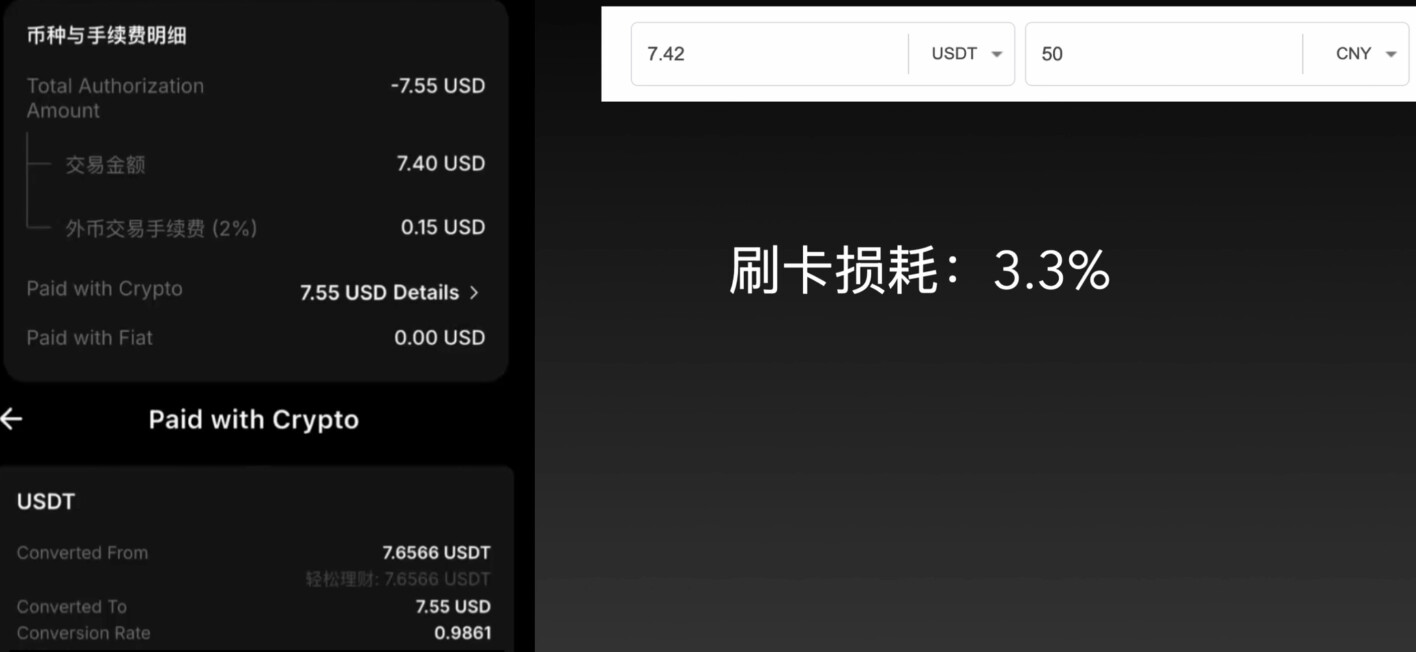
I tested a transaction worth 50 Chinese yuan to calculate the actual cost.
The transaction amount displayed by the Bybit card was basically consistent with the real-time exchange rate. The foreign-currency conversion fee is listed as 2%, but the actual calculation came out below 2%. However, that figure alone is insufficient; you need to check the detailed data under “details,” because USDT is converted into US dollars for payment and the conversion process incurs a loss.
The actual transaction cost measured was approximately 3.3%.
That may seem high, but it is within the normal range for USDT cards. Anything much lower would actually be unusual. The key point is that Bybit provides rebates:
- New users receive 10% card cashback during the first month (supported by certain merchants).
- Existing users receive 2% cashback in everyday use.
After deducting the 2% cashback for existing users, the overall cost is approximately 1.3%, which is cheaper than the Gate card’s 1.8% and still quite worthwhile.
How do I claim the full 120 USDT new-user reward?
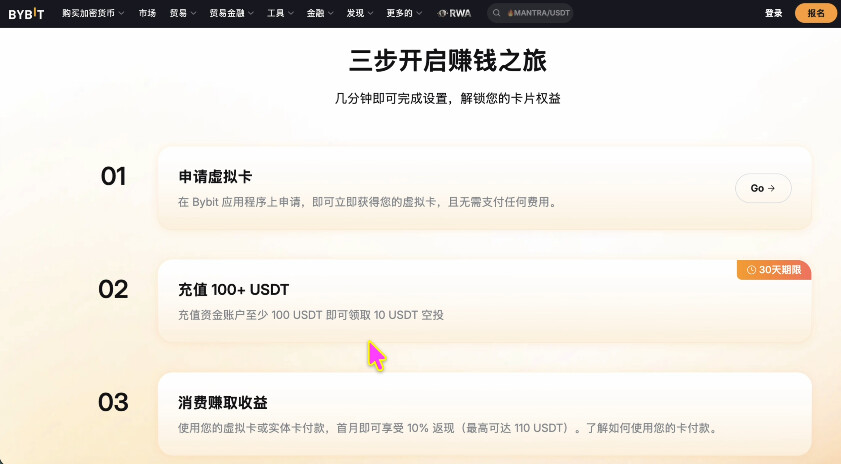
The 120 USDT new-user reward consists of two parts:
Part One: 10 USDT top-up reward
The rules page says, “Complete a 100 USDT top-up within 30 days of opening the card to receive 10 USDT,” but there is actually an unstated hidden condition: you must also complete 100 USDT in card transactions within 14 days as soon as possible before the 10 USDT is credited. Many people top up but do not use the card, and consequently never receive the reward. Bybit’s reward rules are somewhat vague, but actual enforcement is stricter than the wording suggests, so be careful.
Part Two: 100 USDT card cashback
You receive 10% cashback on card transactions during the first month, up to 110 USDT. However, most merchants are not supported; only certain merchants trigger the cashback. You have to test which merchants are supported yourself or check other users’ reports in the comments. Claim whatever you can.
Frequently asked questions
Q: What if I do not have a Taiwan node? Can I use another node?
Nodes in Japan, the United States, and Hong Kong do not work and may cause registration or card-opening failure. A Taiwan node is recommended. If you do not have one, a South Korean node also works; I tested it and had no problems.
Q: What should I do if the country-code selector gets stuck when applying for the card?
This is a known bug caused by entering the application process before linking a phone number. The solution is to exit the application process, manually link your phone number in “Security Settings” (mainland Chinese numbers can receive verification codes normally), and then re-enter the card-opening process. It should no longer get stuck.
Q: How long will the application window for this Taiwan card remain open?
This is clearly a bug in Bybit, and no one knows when it will be closed. If you can still enter the application process and see the message “You are eligible,” the window is still open, so you should act quickly. If your application fails, wait a while and try again, or check the latest feedback from other users in the comments.
That covers the detailed process for applying for a Bybit Taiwan card—the latest 2026 guide to opening a card with no entry requirements. For more information about applying for a Bybit virtual card, please follow other related articles on Script Home!
Disclaimer: This article is provided solely for market information. All content and opinions are for reference only, do not constitute investment advice, and do not represent the views or position of this site. Investors should make their own decisions regarding investments and transactions. The author and this site assume no responsibility for any direct or indirect losses resulting from investors’ transactions!