Now supports both Worker and Docker deployment!
Preface
Do you have too many VPS, domains, eSIMs, or server subscriptions piling up, especially those with post-operation x-day extensions, and it’s a headache to manage them all? Using Excel is too much hassle, and the default phone reminders are too inflexible. So, I pushed Hakimi to develop RenewHelper (Chrono Watcher).
 What is RenewHelper?
This is a fully Cloudflare Workers-based full-stack service lifecycle management tool.
No server required, no database required, completely free, simple to deploy, and all data stays with you. Never worry about forgetting to renew/extend/sign in again. Now supports Docker deployment.
The UI features a mecha-style design with a cool breathing animation effect. It perfectly supports multi-task reminders & management, Lunar calendar cycles, and multi-platform iCal subscription sync.
 UI Preview
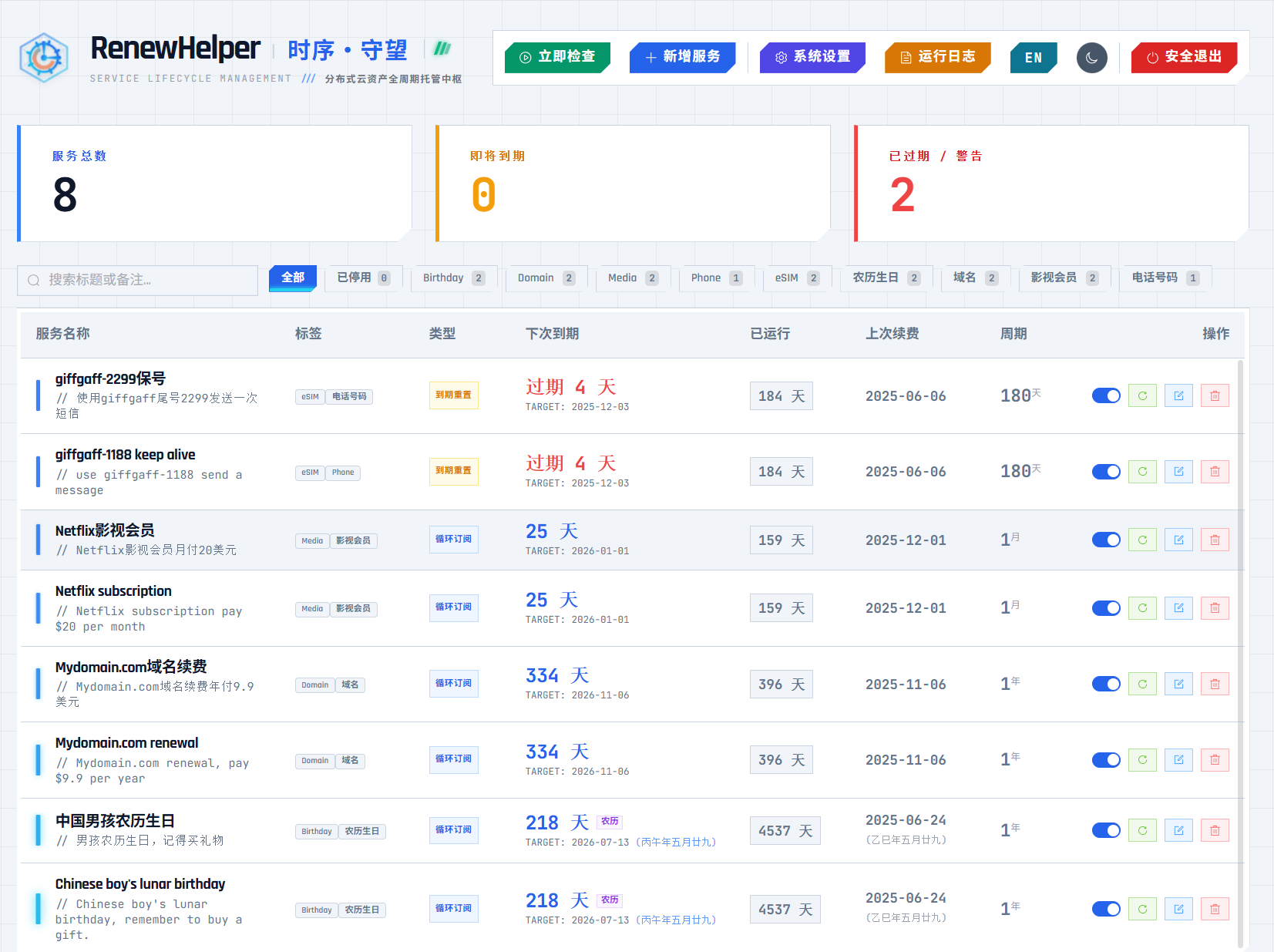
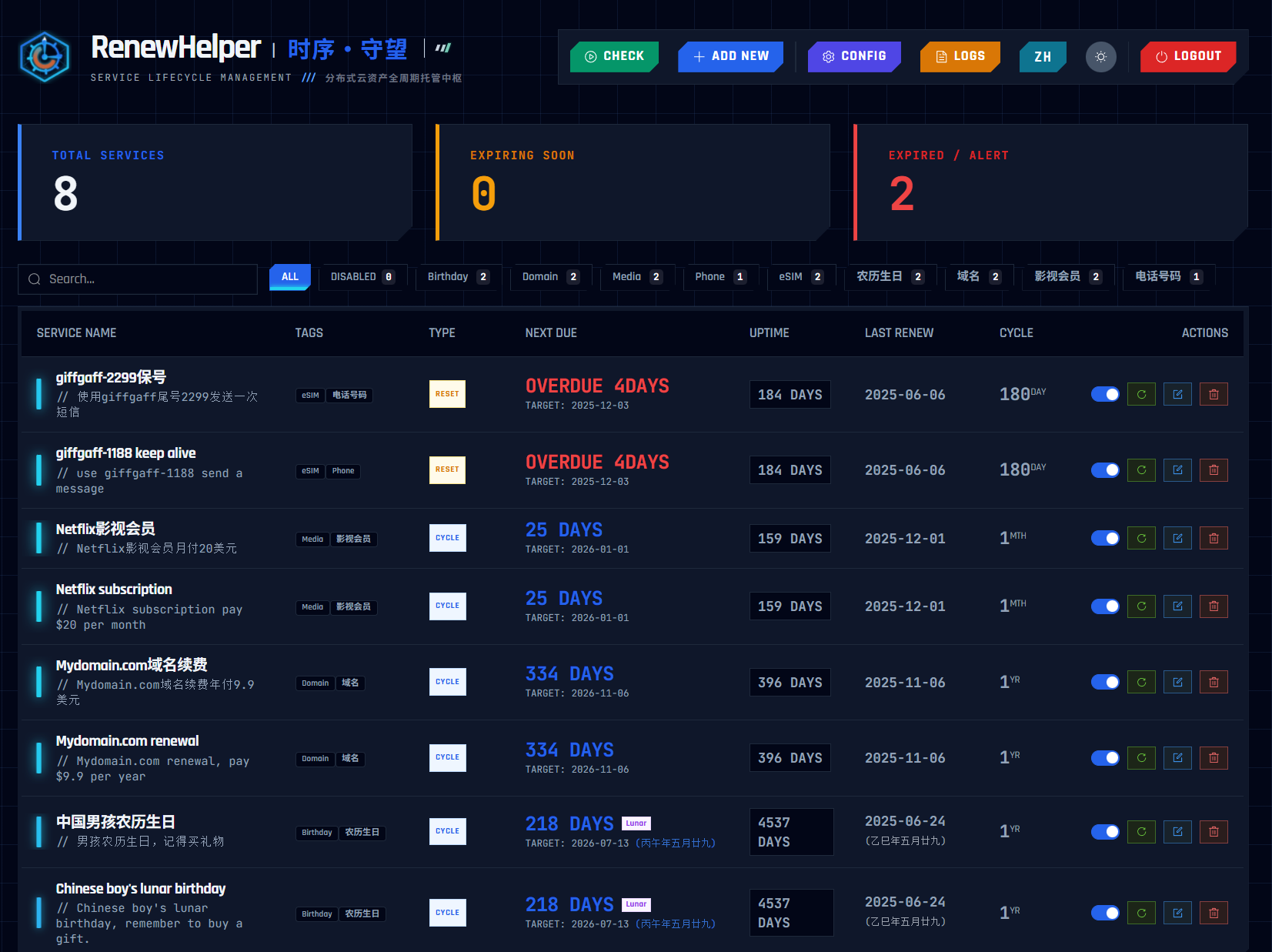
 Core Features
 Zero-cost Serverless: Deploy directly on CF Workers; the free tier (100,000 requests/day) is more than enough.
 Powerful Recurrence Algorithms:
- Supports Gregorian cycles (monthly/yearly VPS, domains, video memberships).
- Supports Lunar calendar cycles (mainly for lunar birthdays and traditional festivals).
- Supports “post-expiry reset” mode (perfect for eSIM retention, Google Voice retention, or check-in renewal scenarios where extensions happen after you take action).
 Multi-channel Notifications: Built-in integration with Telegram, Bark (iOS), PushPlus (WeChat), NotifyX, Resend (email), Webhook.
 ICS Calendar Subscription: Special feature. It generates a
.icssubscription link that you can add to your iPhone or Google Calendar; all service expiry dates are automatically synced to your system calendar, so you always get reminders at the right time. Security & Privacy: Your data is stored in your own CF KV account, with JWT authentication and anti-brute-force rate limiting.
 How to Deploy (Step-by-step Guide)
Deployment is extremely simple—around 3 minutes.
Method 1: One-click Deployment (Recommended)
Just star and fork my GitHub repo, then click the “Deploy to Cloudflare Workers” button.
GitHub URL: https://github.com/ieax/renewhelper
Method 2: Manual Deployment
- In the CF dashboard, create a KV namespace called
RENEW_KV. - Create a new Worker and paste in the
_worker.jscode. - Bind the
RENEW_KVnamespace in your Worker settings. - Add an environment variable
AUTH_PASSWORDas your login password. - Important: Add a Cron Trigger (scheduled task) with this rule:
0/30 * * * *(checks renewals/pushes every 30 minutes). This keeps reminder times in sync with monitored projects. Failing to set this correctly will break notification reliability.
Method 3: Docker Deployment
- Your server must have Docker and Docker Compose installed.
- Create a new folder on your VPS (e.g.,
renewhelper). - Inside the folder, create a file named
docker-compose.ymlwith the following content:
services:
  renew-helper:
    # Official image address
    image: ieax/renewhelper:latest
    container_name: renew-helper
    restart: unless-stopped
    ports:
      - "9787:9787" # Maps container port 9787 to host port 9787
    volumes:
      # Data persistence: Mount ./data on host to /data in container, so data survives restarts
      - ./data:/data
    environment:
      # --- Essential configuration ---

      # 1. Login password (required)
      - AUTH_PASSWORD=your-access-password

      # 2. Scheduled task frequency (critical)
      # Recommendation: run every 30 minutes; do NOT change!
      # Syntax: "0,30 * * * *" triggers at 0 and 30 past the hour.
      - CRON_SCHEDULE=0,30 * * * *

      # 3. Container time zone
      # Controls when Cron "wakes up"; set this to your local time zone
      - TZ=Asia/Shanghai
- Start the service:
docker compose up -d
- Open your browser and visit:
http://your-server-ip:9787. For secure internet access to RenewHelper (likehttps://renew.example.com), it’s recommended to set up a reverse proxy.
 Configuration Guide (Pitfall Prevention)
After deploying, login for the first time (default password is admin), then click the System Settings in the top right.
Here’s a configuration guide screenshot for reference:
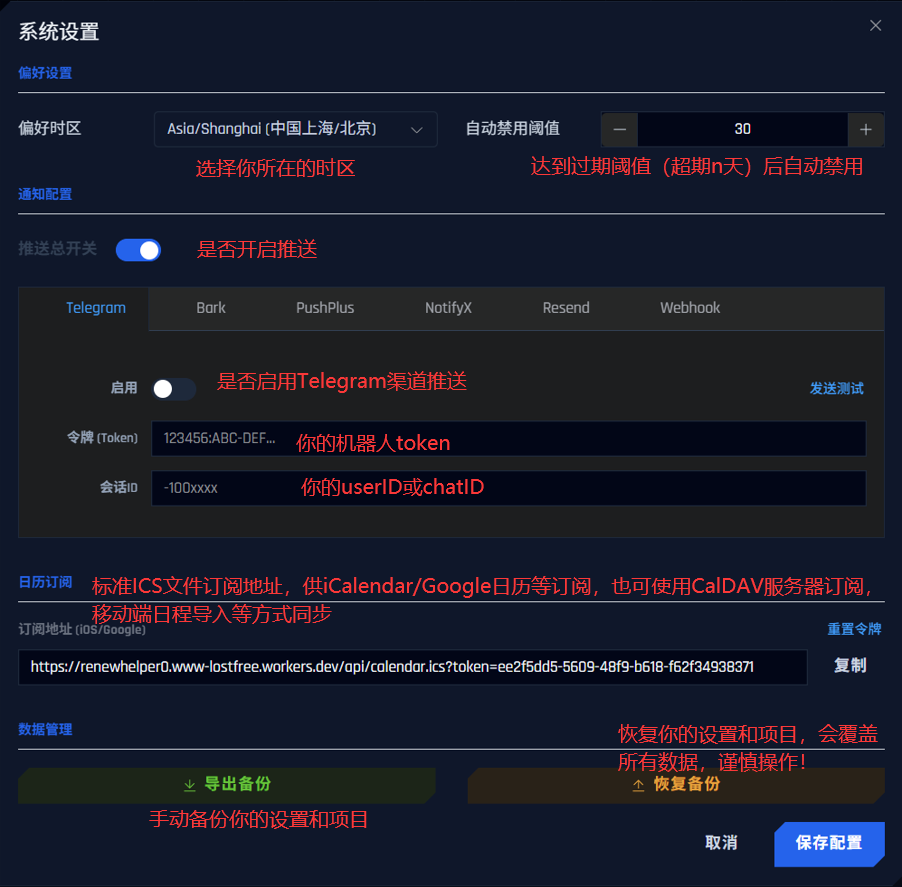
A few key points:
- Preferred Time Zone: Make sure to pick the correct one (e.g.,
Asia/Shanghai), or your notification/calendar times may drift. - Notification Channels: Each notification channel is configurable, supporting push to multiple platforms simultaneously:
- Telegram: Enter your Token and ChatID.
- Bark: iOS must-have, enter Server and Key.
- PushPlus & NotifyX: WeChat push, requires QR code registration to get a Token. PushPlus has a more generous free tier.
- Resend: If you want email notifications, register for an API Key on the website—no custom email domain needed. Set the sender as
[email protected], recipient as your registered Resend email.
- Calendar Subscription: Copy the link and add it as a subscription calendar in iCalendar/Google Calendar → then sync to your device. See the project README for more details.
- Data Backup: Your data is safe in KV, but it’s still recommended to regularly click “Export Backup” to download the JSON file.
 Common Use Cases
- VPS Renewal: New service → choose “recurring subscription” → set cycle to “1 year” → enable auto-renewal.
- eSIM Number Retention: New service → choose “post-expiry reset” → set cycle to “180 days” → recommended to disable auto-renewal (since you need to manually recharge, then click “Renew” afterward).
- Child’s Lunar Birthday: New service → choose “recurring subscription” → enable “Lunar Calendar” → select date → set cycle to “1 year”.
You can set advance notification days and time as you like (defaults: 3 days early, reminders at 8:00 each day). The system checks every 30 minutes, but only sends notifications at your specified time. Each project has independent reminder times. Notifications continue up to 3 days after expiry, at which point auto-renewal kicks in. If you subscribe to ICS on your phone or other device, you’ll see renewed schedules in your calendar and get native reminders on due days. It’s best to include your renewal method in the notes for each item to remind you where to renew.
 Get the Project
GitHub Repo: https://github.com/ieax/renewhelper
Demo: https://lostfree.de5.net
Absolutely do NOT save your notification channel TOKENS or API KEYS on the demo site!!!
Code is fully open source, MIT License.
If you find it useful, please consider giving a Star  for support!
Bug reports and suggestions are welcome by opening an Issue or commenting in the thread.
